Installing the Yubikey Minidriver for Windows
This software is essential for enabling the use of a Yubico Yubikey 5C NFC Security Key on your computer. Before beginning the installation process, please review the process and ensure your computer meets all prerequisites.
B1 Prerequisites
- Windows 10
- Microsoft (MS) Edge Browser, version 146.0.3856.109
- Internet connection
B2 Download Yubikey Minidriver
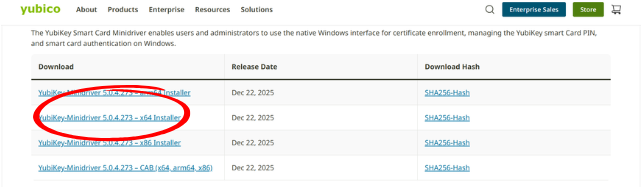
Download the YubiKey minidriver 64 bit file at:
https://www.yubico.com/support/download/smart-card-drivers-tools/
B3 Opening the Yubikey Minidriver File
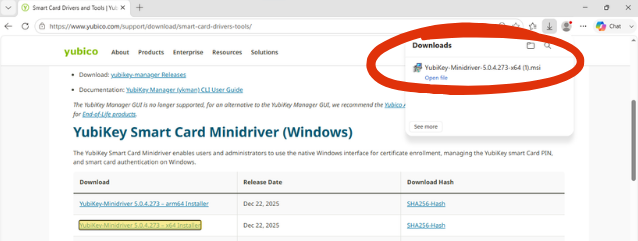
After clicking the download link, MS Edge will display a pop-up confirming the Minidriver file has been successfully downloaded and ready for installation. Click the open file link.
B4 No pop-up window?
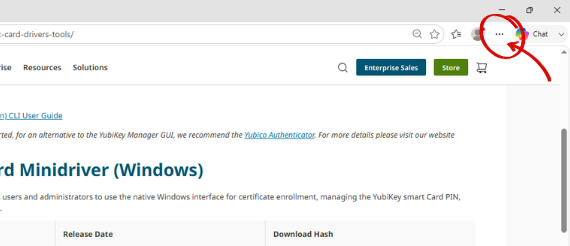
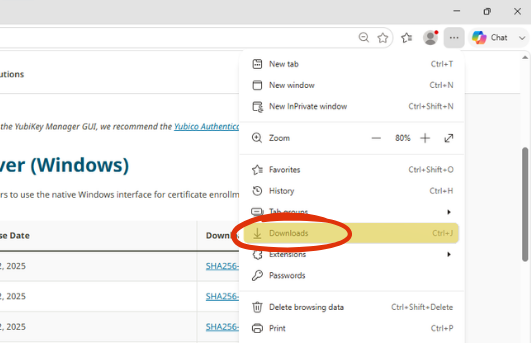
If the pop-up does not appear, or is inadvertently closed, access the downloaded file by clicking the 3-dot menu on the right side of the MS Edge tool bar.
B5 Click Downloads
From the drop-down menu, select Downloads. Next, click the Open file link under the YubiKey-Minidriver-5.0.4.273-x64.msi file (see step B3).
B6 Installing the Yubikey Minidriver
A Setup Wizard pop-up will open – Click Next.
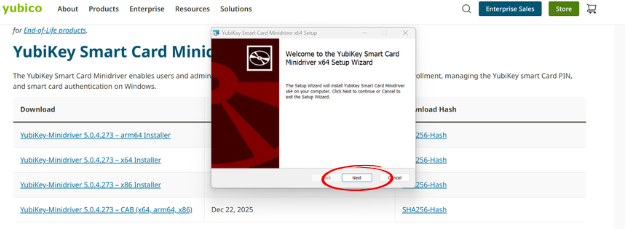
B7 Continue Installing the Yubikey Minidriver
On the next pop-up window – Click Install.
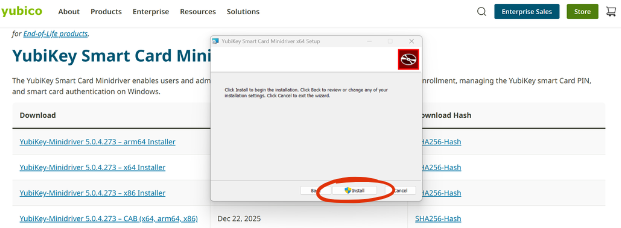
B8 Permission to make changes
The next pop-up message will ask permission to allow the application to make changes on your computer. Click YES.
B9 Finish the install
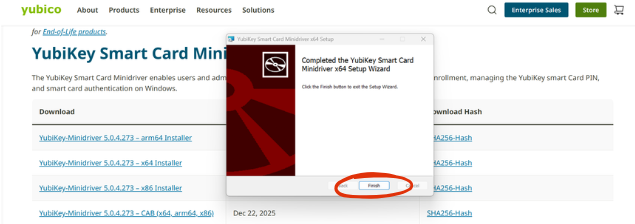
To complete the installation of the Yubikey Minidriver, click Finish.